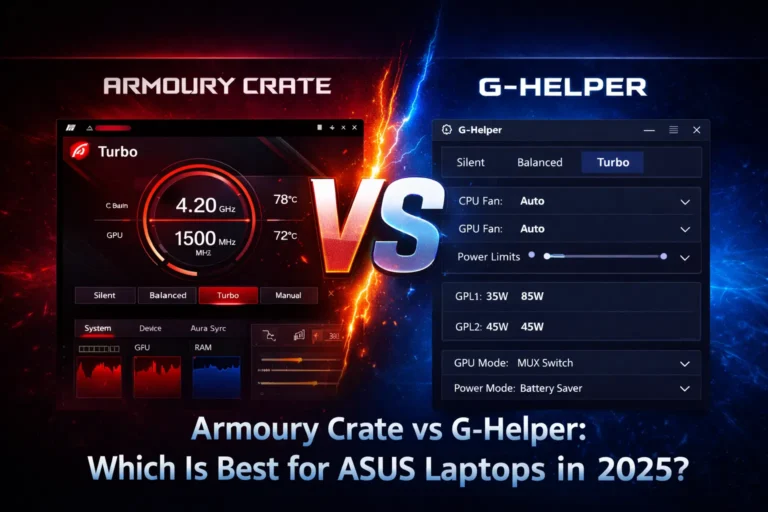
G Helper is a free, open-source program that replaces Armoury Crate on ASUS laptops. It handles fan control, performance mode switching, battery charge limiting, and display refresh rate without the background services and resource usage that come with Armoury Crate. It’s built specifically for ASUS ROG and TUF laptops and is maintained by an independent developer, not by ASUS.
What G Helper Actually Does?
G Helper covers the core hardware controls most people actually use day to day, without the extra bulk that comes packaged with Armoury Crate.
Fan control: It lets you set manual fan speeds or build custom fan curves, working the same way Armoury Crate’s Fan Tuning does so switching over doesn’t mean losing cooling customization.
Performance modes: It let you switch between Silent, Balanced, Performance, and Turbo, the same profiles your ASUS laptop already supports natively, just through a simpler interface that loads faster and uses less memory.
Battery charge limit caps your battery at 80%, or whatever threshold you choose, to slow down long-term battery wear. Armoury Crate has this same feature, but a lot of users find it buried in submenus or behaving inconsistently after updates.
Display refresh rate switching lets you toggle between a high refresh rate for gaming and a lower one to save battery, without going into Windows display settings every time you want to switch.
Is G Helper Safe?
Yes. A few specific reasons this holds up:
- It’s open source. The full code is publicly available on GitHub, so anyone including security researchers can inspect exactly what it does. There’s nowhere for hidden behavior to hide.
- No telemetry. It doesn’t phone home, collect usage data, or send anything to a remote server. Armoury Crate’s background services do more network activity than G Helper does.
- GitHub-verified releases. Every release is published directly on the project’s GitHub releases page, so you can confirm a download matches the actual source code.
- ASUS doesn’t officially endorse it, but doesn’t block it either. It’s third-party software, not an ASUS product, so it won’t show up in ASUS’s own documentation. That said, nothing about how it works conflicts with ASUS hardware or voids anything ASUS controls.
The only real safety risk is downloading G Helper from somewhere other than the official source more on that below.
Does G Helper Void My Warranty?
No. ASUS warranty covers hardware defects manufacturing faults, component failures, physical damage not which software you choose to run. G Helper doesn’t modify your hardware, flash firmware, or change BIOS settings. It sends the same kind of system commands Armoury Crate does, just through a lighter interface. If you ever need warranty service, ASUS technicians look at the hardware itself, not what software was installed at the time.
s G Helper Only for ASUS Laptops?
Yes. G Helper is built specifically for ASUS ROG and TUF laptops. It relies on ASUS-specific hardware controllers (the same ones Armoury Crate uses) to send fan, performance, and battery commands. It won’t work, and isn’t intended to work, on laptops from other brands.
Where to Download G Helper Safely
Only download G Helper from its official GitHub releases page. Because it’s open source and free, copies sometimes appear on third-party “driver download” or software aggregator sites avoid these.
Those sites often bundle extra installers, outdated versions, or in some cases modified files that aren’t the actual project. Going straight to GitHub guarantees you’re getting the real, unmodified release.
Who Should Use G Helper
G Helper is a good fit if:
- You mainly want fan control, performance modes, and battery charge limiting — not RGB lighting
- Armoury Crate has been causing high CPU or RAM usage on your system
- You’ve uninstalled Armoury Crate and want a lighter replacement instead of going without hardware control entirely
- You prefer open-source software you can verify yourself over closed-source ASUS software
Who Should Stick with Armoury Crate
G Helper isn’t the right choice if:
- You use Aura Sync RGB lighting G Helper doesn’t control RGB at all
- You rely on peripheral device pairing (mice, keyboards, headsets) through Armoury Crate
- You want automatic driver and firmware update prompts, which Armoury Crate handles and G Helper does not
For a full side-by-side comparison of what each one covers, see Armoury Crate vs G Helper.
G Helper Limitations
To be clear about what you’re giving up by switching:
- No RGB control. If your laptop has Aura Sync lighting, G Helper won’t touch it you’d need to keep Armoury Crate or use a separate RGB tool just for lighting.
- No peripheral control. Mice, keyboards, and headsets that pair through Armoury Crate’s device hub aren’t supported.
- No automatic driver updates. Armoury Crate periodically prompts you to update ASUS-specific drivers; G Helper doesn’t manage this, so you’d need to check for driver updates manually through ASUS’s site.
If those three things matter to you, G Helper alone won’t fully replace Armoury Crate see Best Armoury Crate Alternatives for other options that might cover the gap.